When a massive service like Microsoft Outlook suddenly stops working around the world, the internet immediately jumps to dramatic theories: hackers, cyberattacks, or AI gone wrong.
In reality, the massive Microsoft 365 and Outlook outage that started on November 12, 2026—affecting hundreds of thousands of people across more than 70 countries—had a much simpler, very human explanation. Microsoft confirmed there was no cyberattack and no rogue AI involved. Instead, a routine network update caused a digital traffic jam that spiraled out of control.
Here is what actually happened behind the scenes,
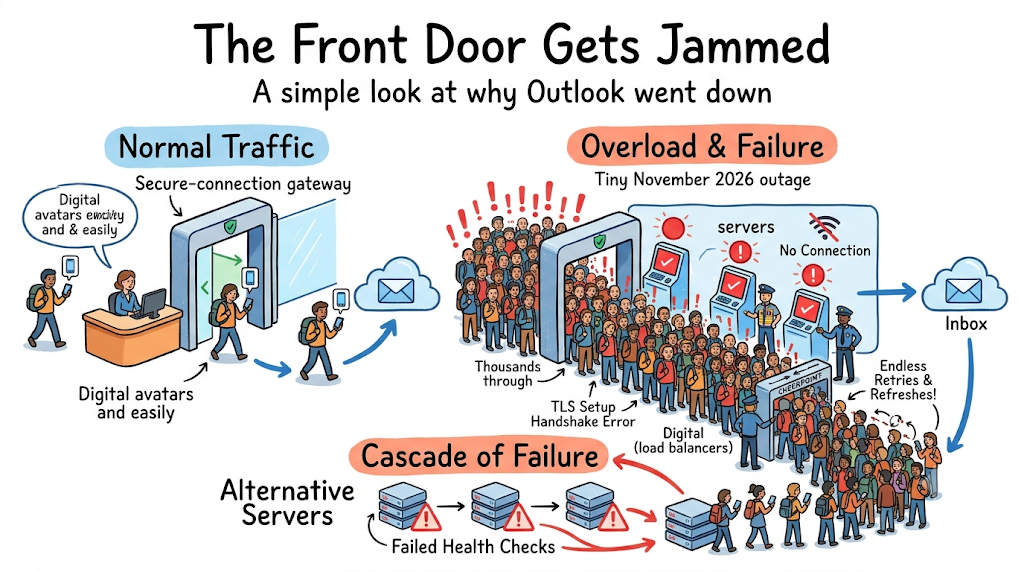
The Front Door Got Jammed
Imagine a massive airport where millions of travelers are trying to walk through security at the exact same time. Even if all the gates and airplanes inside are working fine, nobody can fly if the security checkpoint stops moving.
On November 12, Microsoft pushed out a routine network configuration update. Shortly after, the specific software process responsible for checking IDs and setting up secure connections (the digital handshake your phone or laptop makes with Microsoft’s servers before loading your inbox) got overwhelmed.
Because that "security checkpoint" froze up, your Outlook app couldn't get through the front door—even though your actual emails were sitting safely on the servers behind it.
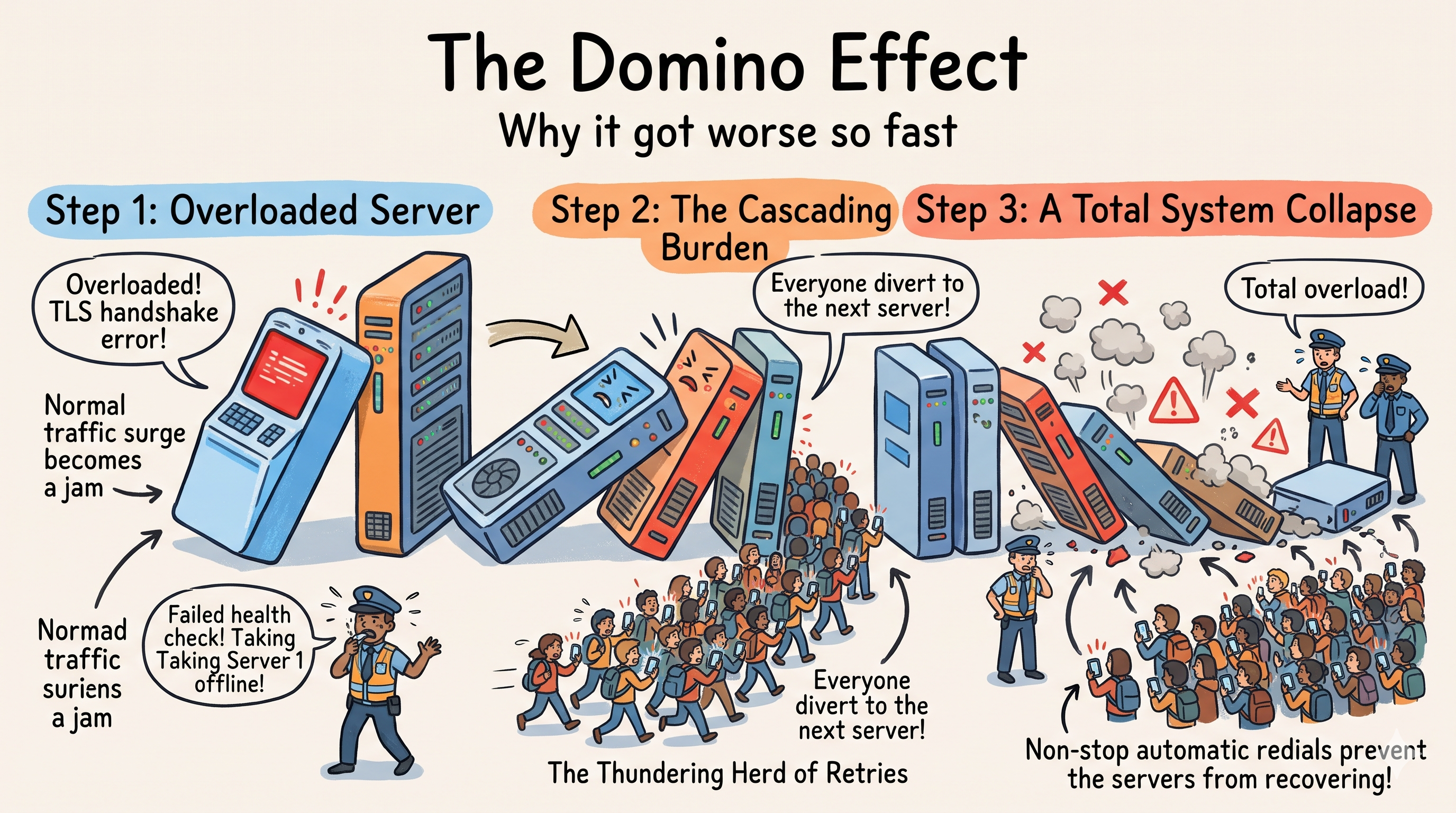
Modern cloud systems use automated traffic cops—called load balancers—to keep things running smoothly. Every few seconds, the traffic cop asks each server, "Are you healthy and responding quickly?" If a server is too slow, the traffic cop takes it offline so users don't get stuck waiting on a broken machine.
Normally, that’s a great safety feature. During this outage, it accidentally made things much worse:
Server 1 slowed down because of the secure-connection jam and failed its check-in.
The traffic cop pulled Server 1 offline and sent all its users over to Servers 2, 3, and 4.
Now Servers 2, 3, and 4 were suddenly carrying way too much weight, so they slowed down and got pulled offline too.
Within hours, healthy servers were dropping like dominoes, dumping the entire world's email traffic onto fewer and fewer machines until the system collapsed.
To make matters worse, every time your phone or laptop failed to connect, it automatically tried again a few seconds later—creating millions of impatient redials that kept knocking servers back down the moment engineers restarted them.
Why It Took More Than a Day to Fix
A lot of people wondered: If a recent update caused the problem, why couldn't Microsoft just hit "Undo" and fix it in five minutes?
Unlike a normal website where you can just refresh the page, email can't simply be ignored or thrown away. Every email sent while Outlook was down had to be saved in a giant waiting room so nothing got lost.
Before Microsoft could turn the floodgates back on, engineers had to:
Fix the underlying login and routing settings so servers wouldn't instantly choke again.
Spin up extra backup servers to handle the massive backlog of impatient apps trying to reconnect.
Extend the email delivery waiting window to 48 hours—giving the system breathing room to slowly deliver millions of delayed emails without crashing all over again.
What We Can Learn From This
Even the biggest tech companies in the world can be tripped up by a chain reaction:
Safety nets can sometimes backfire: Automated systems that kick slow servers offline are great when one machine breaks, but when the whole system is under stress, kicking machines offline just dumps more work onto the survivors.
Small changes have huge ripple effects: You don't need a major software bug to take down a global service—sometimes changing a single traffic setting is enough to start a jam.
Patience keeps systems alive: Just like on a real highway, when traffic backs up, the fastest way to clear the road is to let cars merge slowly rather than opening every lane at once.
References & Further Reading
Microsoft 365 Service Health Advisories: Incident IDs
EX1550543(Exchange Online) andMO1550821(Microsoft 365 Suite), November 12–14, 2026.Outage Telemetry & Impact Reports: Global user report aggregation via Downdetector (peaking at ~140,000 reports across 74 countries).
Distributed Systems Concepts:
Cascading Failures & Load Shedding: Google SRE Book — Addressing Cascading Failures
Retry Storms & Exponential Backoff: AWS Architecture Blog — Timeouts, Retries, and Backoff with Jitter
Disclaimer: All system diagrams and visual illustrations in this article were generated using Gemini.